WireGuard VPN 工具安装与配置
885人浏览 / 0人评论
官网:
https://www.wireguard.com/install/
https://www.wireguard.com/quickstart/
安装及配置参考:
https://baijiahao.baidu.com/s?id=1793384128653593015&wfr=spider&for=pc
服务器
1、安装WireGuard
sudo apt install wireguard2、生成公钥、私钥
wg genkey | tee privatekey | wg pubkey > publickey3、创建配置文件
vim /etc/wireguard/wg0.conf内容如下:
[Interface]
Address = 10.0.0.1/24
PrivateKey = sHWzORA1flnas+pvGmphrwr5jVaZDH0lLPiu6tSc51g=
ListenPort = 51820

[Peer]
PublicKey = fGZu09V4tvMMIpRWq1K45Fpt5oiL2aGfGLD3T+m2QSU=
AllowedIPs = 10.0.0.2/32
4、配置 ip forwarding
vim /etc/sysctl.conf追加如下内容:
net.ipv4.ip_forward = 1
net.ipv6.conf.all.forwarding = 1
使配置生效:
sysctl -p5、配置防火墙
iptables -A FORWARD -i wg0 -j ACCEPT
iptables -t nat -A POSTROUTING -o eth0 -j MASQUERADE
iptables -I INPUT 1 -p udp --dport 51820 -j ACCEPT
ip6tables -A FORWARD -i wg0 -j ACCEPT
ip6tables -t nat -A POSTROUTING -o eth0 -j MASQUERADE
ip6tables -I INPUT 1 -p udp --dport 51820 -j ACCEPT
7、启动
wg-quick up wg08、停止
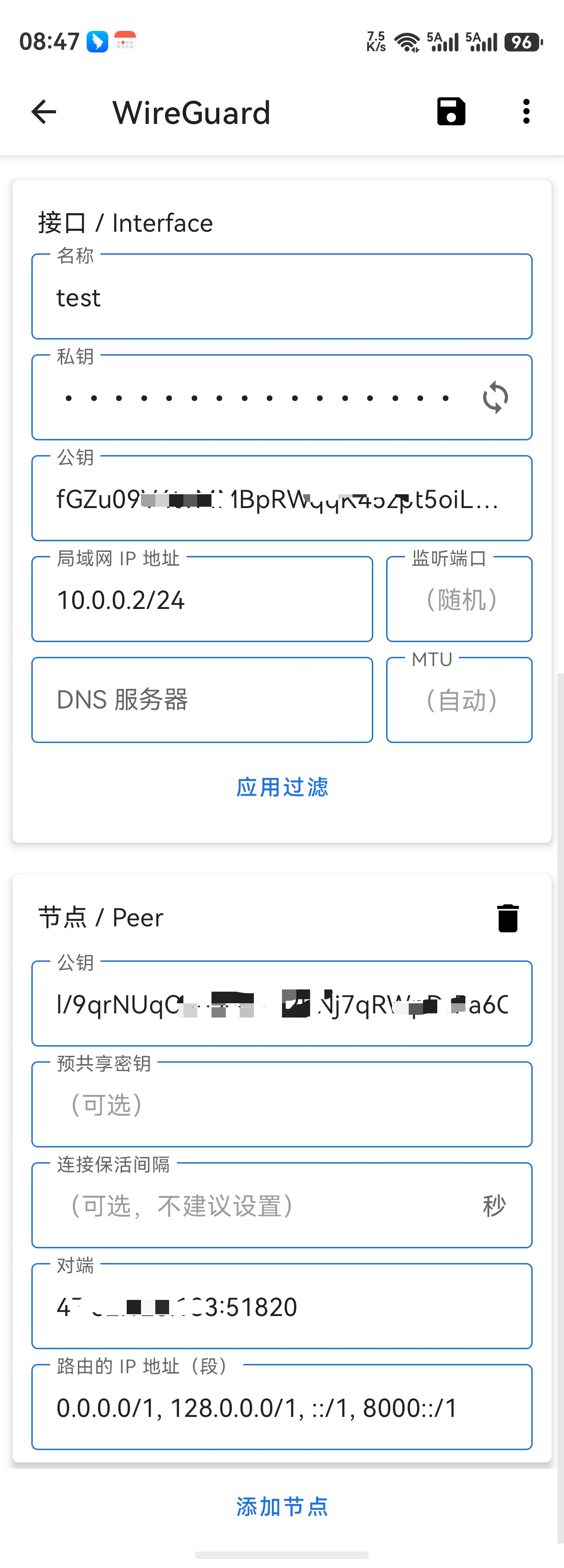
wg-quick down wg0安卓客户端

 豫公网安备 41010702003051号


全部评论