PostgreSQL安装配置
521人浏览 / 0人评论
参考:https://vip.kingdee.com/article/748948271099405312?get_from=article-id&productLineId=0&lang=zh-CN
海光麒麟
sudo yum update
# 开放端口
sudo firewall-cmd --permanent --add-port=5432/tcp
sudo firewall-cmd --reload

# 安装
sudo yum install postgresql-server postgresql-contrib
sudo postgresql-setup --initdb
sudo systemctl start postgresql
sudo systemctl enable postgresql
sudo systemctl status postgresql

# 启用远程登录并修改最大链接数
vim /var/lib/pgsql/data/postgresql.conf
##找到并修改:
listen_addresses = '*'
max_connections=3000

# 修改本地连接认证方式以及启用远程连接
vim /var/lib/pgsql/data/postgresql.conf
修改非注释的首行:
local   all             all                                     peer
将 peer 改为 md5
然后在文件尾行添加:
host all all 0.0.0.0/0 md5

# 重启
sudo systemctl restart postgresql

# 修改postgres用户的密码(默认为:psql)
sudo -i -u postgres
\passwd postgres
\q
exit

# 本地登录测试
psql -U postgres -d postgres
Ubuntu
# 官网:https://www.postgresql.org/download/linux/ubuntu/
# 国内镜像:https://mirrors.ustc.edu.cn/ubuntu/

# 下载字符集
apt install language-pack-zh-hans

vim /etc/locale.gen
# 解除 zh_CN.UTF-8 UTF-8 注释
locale-gen

# 设置系统默认编码
vim /etc/profile
## 添加下面两行:
export LANG=zh_CN.UTF-8
export LANGUAGE=zh_CN:zh

# 使修改生效
source /etc/profile

# 查看是否生效
locale

# 安装postgresql
apt install postgresql

# 启用远程登录并修改最大链接数
vim /etc/postgresql/16/main/postgresql.conf

# 修改 postgres 密码
sudo -i -u postgres
psql
ALTER USER postgres WITH PASSWORD '123456';
exit
exit

# 然后修改pg_hba.conf,位置在/etc/postgresql/16/main/pg_hba.conf,16是版本号
pg_hba.conf配置如下:
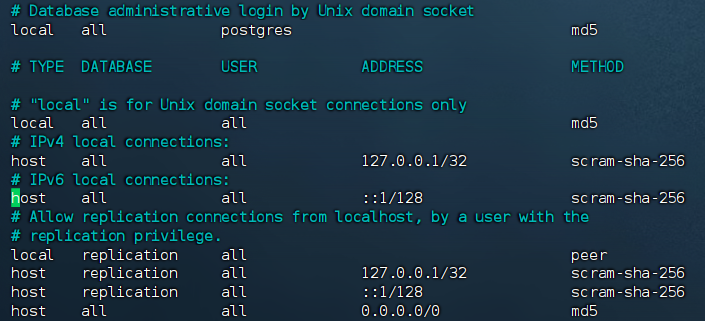
PostgreSQL配置
修改时区
# 设置时区,esc退出输入模式,按 “/”键,输入timezone,修改为“Asia/Shanghai”,输入log_timezone,修改为“Asia/Shanghai”
# 找到lc_messages、lc_monetary、lc_numeric、lc_time,修改为“zh_CN.UTF-8”
日志配置
修改postgresql.conf文件:
log_destination = 'stderr'
logging_collector = on
log_directory = 'log'
log_rotation_age = 1d
log_rotation_size = 100MB
log_min_messages = debug1
log_min_duration_statement = 60
log_checkpoints = on
log_connections = on
log_disconnections = off
log_duration = off
log_hostname = off
log_line_prefix = '%r %m [%p] %q%u@%d '
log_lock_waits = on
log_statement = 'mod'
log_timezone = 'Asia/Shanghai'
pgloader
官网:https://pgloader.readthedocs.io/en/latest/install.html
mysql导出到postgresql:https://pgloader.readthedocs.io/en/latest/ref/mysql.html
apt install pgloader

# 最好使用jar包运行(需要java21)
curl -L -o pgloader.jar https://github.com/dimitri/pgloader/releases/download/v4-dev/pgloader.jar
java -jar pgloader.jar my.load
mysql_to_postgres.load
LOAD DATABASE
    FROM mysql://root:123456@192.168.1.63:3306/test
    INTO postgresql://postgres:123456@127.0.0.1:5432/test

WITH drop schema, create tables, create indexes, foreign keys, reset sequences, downcase identifiers

SET work_mem to '64MB',
    maintenance_work_mem to '512MB',
    search_path to 'public'

CAST type datetime to timestamptz drop default drop not null using zero-dates-to-null,
     type date drop not null using zero-dates-to-null,
     type tinyint to boolean using tinyint-to-boolean

AFTER LOAD DO
    $$ DO $func$ DECLARE r RECORD; BEGIN FOR r IN SELECT schemaname, tablename FROM pg_tables WHERE lower(schemaname) = 'test' LOOP EXECUTE format('ALTER TABLE %I.%I SET SCHEMA public', r.schemaname, r.tablename); END LOOP; END $func$; $$,
    $$ DO $func$ DECLARE r RECORD; BEGIN FOR r IN SELECT sequence_schema, sequence_name FROM information_schema.sequences WHERE lower(sequence_schema) = 'test' LOOP EXECUTE format('ALTER SEQUENCE %I.%I SET SCHEMA public', r.sequence_schema, r.sequence_name); END LOOP; END $func$; $$,
    $$ DROP SCHEMA IF EXISTS "test" CASCADE; $$,
    $$ DROP SCHEMA IF EXISTS testCASCADE; $$
;
注意:
1、MySQL的 tinyint 在Java代码里可能是Integer 或 Boolean,需要单独转换:
type tinyint to boolean using tinyint-to-boolean
或
type tinyint to integer
或
type tinyint to integer using tinyint-to-boolean
或
column sys_permission.is_leaf to boolean using tinyint-to-boolean
2、如果 tinyint 在Java代码里既有 Integer 又有 Boolean,则先统一转为 integer,再单独将某些表字段修改为Boolean,可以在 .load 的文件 AFTER LOAD DO代码块中添加修改语句:
AFTER LOAD DO
    $$ DO $func$ DECLARE r RECORD; BEGIN FOR r IN SELECT schemaname, tablename FROM pg_tables WHERE lower(schemaname) = 'test' LOOP EXECUTE format('ALTER TABLE %I.%I SET SCHEMA public', r.schemaname, r.tablename); END LOOP; END $func$; $$,
    $$ DO $func$ DECLARE r RECORD; BEGIN FOR r IN SELECT sequence_schema, sequence_name FROM information_schema.sequences WHERE lower(sequence_schema) = 'test' LOOP EXECUTE format('ALTER SEQUENCE %I.%I SET SCHEMA public', r.sequence_schema, r.sequence_name); END LOOP; END $func$; $$,
    $$ DROP SCHEMA IF EXISTS "test" CASCADE; $$,
    $$ DROP SCHEMA IF EXISTS testCASCADE; $$,

    $$ ALTER TABLE user_info ALTER COLUMN del_flag DROP DEFAULT; $$,
    $$ ALTER TABLE user_info ALTER COLUMN del_flag TYPE boolean USING del_flag::boolean; $$,
    $$ ALTER TABLE user_info ALTER COLUMN del_flag SET DEFAULT false; $$,

    $$ ALTER TABLE user_info ALTER COLUMN state TYPE boolean USING state::boolean; $$
3、.load 文件中每一个代码块的结尾不能有标点符号,如:
CAST type datetime to timestamptz drop default drop not null using zero-dates-to-null,
     type date drop not null using zero-dates-to-null,
type tinyint to boolean using tinyint-to-boolean, 豫公网安备 41010702003051号


全部评论